What this project is
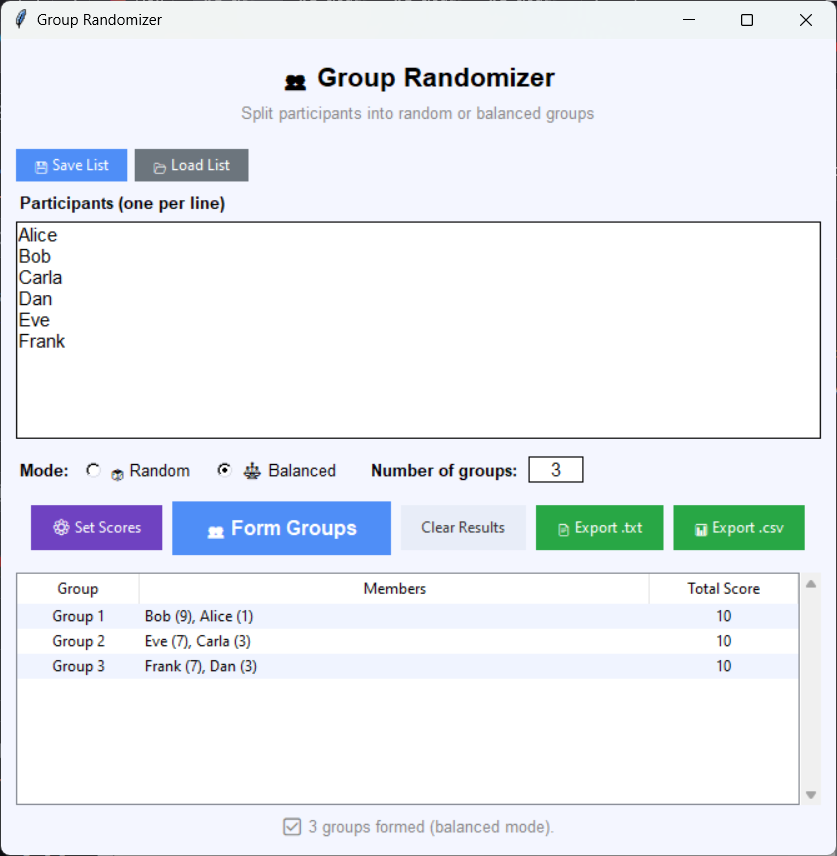
Group Randomizer is a Python desktop app built with Tkinter. You type or load a list of names, choose how many groups you want, and click Form Groups. It is made for teachers, team leads, event hosts, and game organizers who need fair teams quickly.
It uses only Python’s standard library, so there is nothing to install besides Python itself.
🎲 Random mode
Shuffles the list and deals people into groups one by one, so group sizes never differ by more than one person.
⚖️ Balanced mode
Give each person a score from 1 to 10. The app distributes people so every group ends up with a similar total score.
How balanced mode works
Balanced mode uses a snake draft, the same idea sports leagues use to keep teams even. People are sorted by score from highest to lowest. The first round hands one person to each group in order. The second round goes in reverse, so the group that got the best player first gets the next pick last. The direction keeps flipping every round.
People with the same score are shuffled before sorting, so ties don’t always land in the same groups. Clicking Form Groups again gives a fresh, still-balanced result.
Example from the screenshot, with three groups:
| Round | Direction | Group 1 | Group 2 | Group 3 |
|---|---|---|---|---|
| 1 | Group 1 → 3 | Bob (9) | Eve (7) | Frank (7) |
| 2 | Group 3 → 1 | Alice (1) | Carla (3) | Dan (3) |
| Total score | 10 | 10 | 10 |
Features
- Two modes: pure random, or score-balanced.
- Score editor: a pop-up window with a 1–10 spinbox for each person. Scores are remembered when you switch modes.
- Results table: shows each group’s members and, in balanced mode, the group’s total score.
- Save and load: store your participant list and scores as a JSON file and open it again later.
- Export: save results as a
.txtfile or a.csvfile you can open in Excel or Google Sheets. - Input checks: warns you about invalid group counts, more groups than people, and missing scores (which default to 5).
How to run it
You need Python 3 with Tkinter, which is included in most Python installers for Windows and macOS. Then run:
python3 group_randomizer.pyOr skip the setup and download the ready-to-use version from itch.io.
Save file format
Saved lists are plain JSON, so you can also edit them by hand. Scores are only used in balanced mode.
{
  "participants": ["Alice", "Bob", "Carla"],
  "scores": { "Alice": 8, "Bob": 5, "Carla": 6 }
}